Panset — Cinematic Gimbal Control for DJI Osmo Pocket 3/4/4P and Insta360 Luna Ultra/Pro
Even pans, tilts and zooms in selectable speed gears with a soft ramp, plus roll moves on the Osmo Pocket: Panset turns your phone into the controller for your gimbal camera, on iOS and Android.

Panset turns your phone into a smooth cine gimbal controller for your gimbal camera — for the DJI Osmo Pocket 3, 4 and 4P and for the Insta360 Luna Ultra and Luna Pro. Instead of the twitchy hardware joystick, you control pan, tilt and zoom — and roll on the Osmo Pocket — via selectable speed gears with a soft ramp in and out: even, calm camera moves the on-device joystick cannot deliver. On iOS and Android.
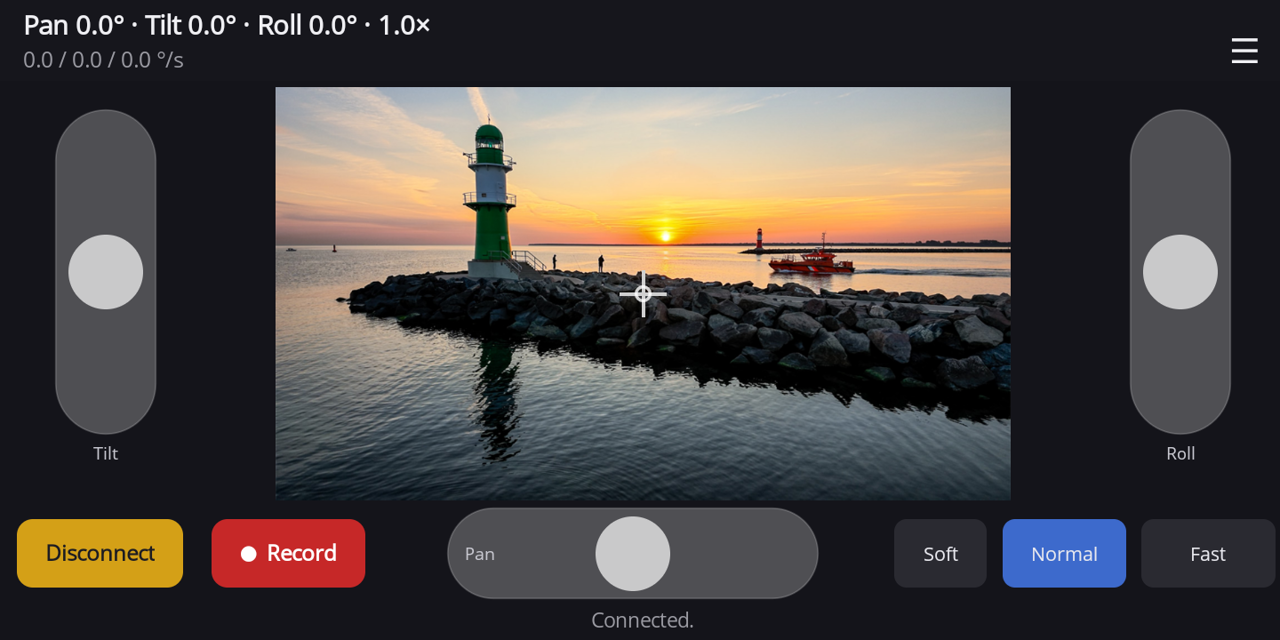
- Smooth gear control: three gears (Soft, Normal, Fast) with a soft ramp when starting and stopping; the pad deflection picks the speed within the gear. Gears are stored per camera.
- Insta360 Luna Ultra and Luna Pro: pan, tilt, zoom, recording and live view just as on the Osmo Pocket, with their own gears. You confirm the control once on the Luna's display (see Connecting). The Luna has no controllable roll axis.
- Roll (Osmo Pocket only): level the horizon precisely or tilt it on purpose, with its own fine response curve. The manufacturer's app does not offer this.
- Live view with crosshair: check your framing directly; one tap centres the camera. The speed line shows the speed actually set in °/s and the zoom speed in %/s.
- Zoom in the gear: zoom steplessly and as slowly as you like. Every gear has its own zoom speed with the same soft ramps, and optionally a zoom range (such as 1 to 2.99× or above) so that the lens switch at 3× — on the Pocket 4P and the Luna Ultra — never happens mid-recording.
- Recording: start and stop recording without touching the camera.
- Three layouts, freely assignable sliders: portrait, landscape and thumb layout for two-handed operation; each slider can be assigned pan, tilt, zoom or roll.
- Direct & private: Panset talks only to your camera's local Wi-Fi/Bluetooth. No account, no cloud, no tracking.
- iOS and Android, English and German.
Supported cameras: DJI Osmo Pocket 3, DJI Osmo Pocket 4 (including 4P), Insta360 Luna Ultra and Insta360 Luna Pro. Requirements: iPhone with iOS 17 or later, Android phone with Android 12 or later, Bluetooth LE and Wi-Fi. Details under Compatibility.
No data collection. Panset collects nothing, phones nothing home and embeds no analytics or third-party services. Details in the privacy policy.
Everything else step by step in the guide: connecting, gears, ramps and zoom, slider assignment, live view and layouts. If something goes wrong, see Help.
Panset is free.
Documentation
Guide
Step by step: connecting on iOS and Android, gears, ramps and zoom, slider assignment, live view and layouts.
Compatibility and requirements
Supported cameras, phone requirements and what Panset needs technically.
Help and troubleshooting
The app's messages and what they mean: camera not found, PIN, Bluetooth, Wi-Fi join, session.